TPC-BF5401-B13-BC-S2 • Dahua

| Content | |
| Thermal Camera | |
| Detector Type | Vanadium oxide uncooled focal plane detector |
|---|---|
| Thermal Image Resolution | 400 x 300 |
| Pixel Size | 17 μm |
| Spectral Range | 8 μm ~ 14 μm |
| NETD | ≤ 35 mK |
| Color Palettes | 18 |
| Infrared Lens | |
| Lens Type | Fixed IR lens |
| Focal Length | 13 mm |
| Field of View (H x V) | 30.4° x 22.5° |
| Video | |
| Video Compression | H.265, H.264, M-JPEG |
| Smart / Wise / Zip Streaming | N/A |
| Thermal Video | |
| Maximum Resolution | 1.3 MP / 1280 x 1024 |
| Maximum Framerate (fps) | 60 fps / 1.3 MP |
| Streaming Capability | Dual |
| Operational | |
| Digital Noise Reduction | 2D / 3D DNR |
| Image Rotation | Image flip |
| Thermal Analytics | |
| Thermal AI Object Classification | Person, Vehicle |
| Thermal AI Analytics | Heat |
| Fire Detection | N/A |
| Smoke Detection | N/A |
| Heat / Temperature Detection | Heat |
| Radiometry | |
| Temperature Detect Range | N/A |
| Temperature Measurement Accuracy | N/A |
| Temperature Measurement Distance | N/A |
| Interface | |
| Control Interface | RS-485 |
| Video Interface | CVBS |
| Edge Storage | MicroSD (Optional) |
| Memory Card Slot | 1 slot |
| Audio | |
| Audio Input | 1 |
| Audio Output | 1 |
| Built-in Microphone | N/A |
| Built-in Speaker | N/A |
| Audio Communication | Two-way audio |
| Alarm | |
| Alarm Input | 2 |
| Alarm Output | 2 |
| PIR Sensor | N/A |
| Light Warning | N/A |
| Network | |
| Ethernet | RJ-45 10/100 BASE-T |
| Wireless LAN | N/A |
| Mobile Broadband and GNSS | N/A |
| API (Application Programming Interface) | ONVIF, CGI |
| Network Storage | Network Optix Nx Witness, Milestone XProtect, Dahua DSS Pro, Dahua NVR, Dahua Hybrid DVR |
| Mobile and Desktop Applications | Nx Witness Mobile, XProtect Mobile, DMSS, DSS Agile |
| Environmental | |
| Operating Temperature | -30°C ~ 70°C |
| Humidity | < 95% |
| Ingress Protection | IP67 |
| Vandal Resistance | N/A |
| Electrical | |
| Input Voltage | 12 V DC, PoE (IEEE 802.3af), ePoE |
| Max Power Consumption | 13 W (12 V DC), 14 W (PoE) |
| Mechanical | |
| Dimensions | 291.0 x 103.0 x 97.0 mm |
| Net Weight | 1.40 |
| Casing Material | Metal |
| Casing Color | White |
| Certification | |
| Certificates | CE |
| Package | |
| Package Contents | Quick start guide |
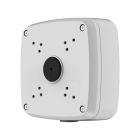
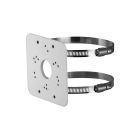
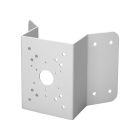
| Related Accessory | PFA121-V2, PFA152-E, PFA151 |
| Link to Manufacturer | www.dahuasecurity.com |
| Notes | N/A |
Firmware download:
You can find the current firmware on the official website of the manufacturer www.dahuasecurity.com.
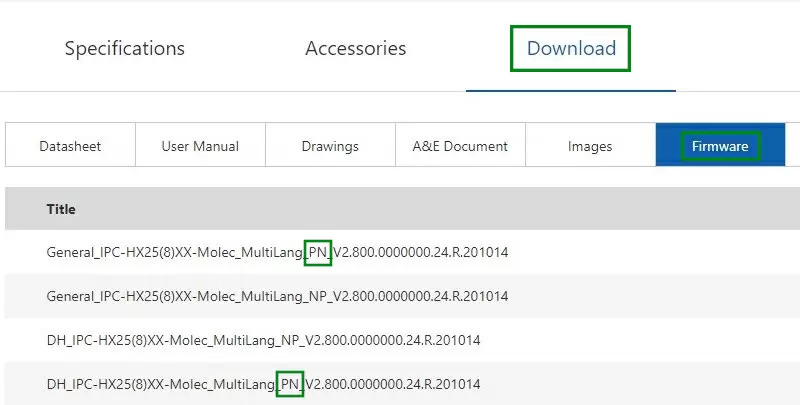
In the upper right corner of the search section, you need to enter the name of the camera and find the exact model. Then look for the Firmware tab. Several firmware may be listed for each product. If they have the same name and differ only in the letters PN or NP, choose firmware with the PAL standard, and therefore PN.
If you do not want to upgrade the firmware yourself, please contact our technical support: technika@gemtech.eu
Or call the phone number: 052 7897891.
Popular tools:
ConfigTool
ConfigTool 5.1 integrates ConfigTool Batch Mode, ACS Config, VDP Config, ARC Config. lt supports Dahua devices'information check device initalization, single/batch lP modification, parameter configuration, password reset, firmware upgrade, device reset, time calibration, CGl.
Update time:2023-06-25 13:44:25
Version:V5.1.2
SmartPSS Lite
The SmartPSS Lite Client Software is designed to configure and manage Dahua devices such as IP cameras, recorders (NVRs, XVRs), access control devices (ASIs, ASCs, ASRs), attendance management devices (ASAs), and video intercom devices (VTOs, VTHs, VTSs).
Update time:04.02.2024
Version:V1.3.5
SmartPSS Lite Mac
The SmartPSS Lite Client Software is designed to configure and manage Dahua devices such as IP cameras, recorders (NVRs, XVRs), access control devices (ASIs, ASCs, ASRs), attendance management devices (ASAs), and video intercom devices (VTOs, VTHs, VTSs).
Update time:10.12.2024
Version:V1.003
If you need more help, please contact our technical support: support@gemtech.eu
Or call the phone number: 00421 52 7897891.