
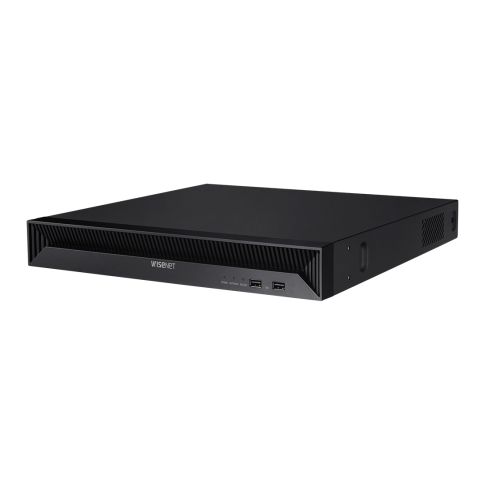
QRN-1630S • Wisenet

SKU
QRN1630S
Warranty:
24 months
Availability:
16-channel network video recorder with 16-port PoE switch
| Content | |
| System | |
| Operating System | Embedded Linux |
|---|---|
| Processor | N/A |
| RAM | N/A |
| DOS | N/A |
| Video | |
| IP Camera Inputs | 16 channels |
| Total Channels | 16 channels |
| Display | |
| Local Video Outputs | HDMI |
| Maximum Display Resolution | 4K UHD / 3840 x 2160 |
| Decoding Capability | 8 MP @ 60 fps, 1080p @ 240 fps, 720p @ 480 fps, D1 @ 960 fps |
| Recording | |
| Video Compression | H.265, H.264, M-JPEG |
| Smart / Wise / Zip Streaming | WiseStream |
| Recording Bandwidth | 128 Mbps |
| Maximum Recording Resolution of IP Cameras | 8 MP |
| Analytics | |
| Object Classification | N/A |
| Object Attributes | N/A |
| Facial Analytics | N/A |
| ANPR | N/A |
| Search and Playback | |
| Simultaneous Playback | 16 channels |
| AI Search | N/A |
| Storage | |
| Built-In Disk | N/A |
| Number Internal Disks | 2x SATA |
| Hot Swap | N/A |
| RAID | N/A |
| External Storage | N/A |
| Backup | |
| Backup | USB, Network |
| DVD-RW | N/A |
| Alarm | |
| Alarm Inputs | 4 inputs |
| Alarm Outputs | 2 outputs |
| Audio | |
| Audio Inputs | 16 CH (Network) |
| Audio Outputs | 1 CH (RCA) |
| Audio Communication | Two-way audio |
| Performance | |
| Easy Configuration | QR code scanning (P2P) |
| Fisheye Dewarping | Supported |
| Redundancy | Failover N+1, Auto recovery backup (ARB) |
| Network | |
| Ethernet | 1x RJ-45 10/100 BASE-T |
| Wireless Communication | N/A |
| Built-In PoE Switch | 16 PoE+ ports RJ-45 |
| Mobile & Desktop Applications | Wisenet mobile, Wisenet SSM, SmartViewer |
| Interface | |
| DisplayPort | |
| HDMI | 2x HDMI |
| VGA | N/A |
| USB | 2x USB |
| eSATA | N/A |
| SAS (Serial Attached SCSI) | N/A |
| Serial Interface | N/A |
| Environmental | |
| Operating Temperature | 0°C ~ 40°C |
| Humidity | < 85% |
| Electrical | |
| Input Voltage | 100 ~ 240 V AC |
| Power Consumption | 200 W |
| Power Redundancy | N/A |
| PoE Power Budget | 130 W |
| Mechanical | |
| Dimensions | 370.0 x 50.7 x 320.0 mm |
| Net Weight | 2.87 |
| Casing material | Metal |
| Casing Color | Black |
| Mounting Type | Desktop, 19“ Rack mount 1U |
| Certification | |
| Certificates | NDAA, CE |
| Package | |
| Package Contents | Mouse, Rack mount kit, Quick Guide |
| Related Accessory | N/A |
| Link to Manufacturer | www.hanwhavision.com |
| Notes | N/A |
| mageworx-dynamic-options | |
Download firmware:
You can always find the current firmware on the manufacturer's official website www.hanwhavision.com
In the search section, you need to enter the name of the camera and find the exact model. You will then search for the Download - Firmware tab.
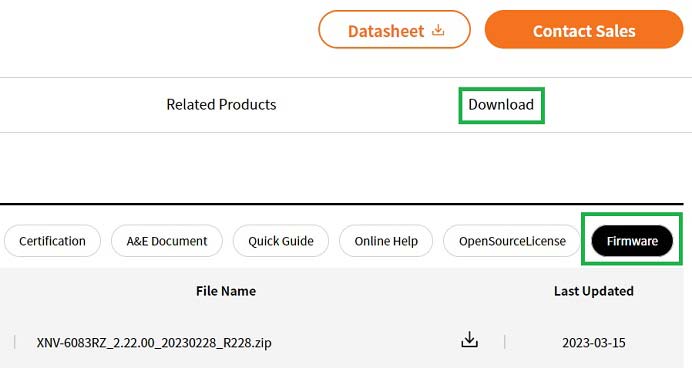
In case of questions, please contact our technical support: technika@gemtech.eu
Phone number: 00421 52 7897891.