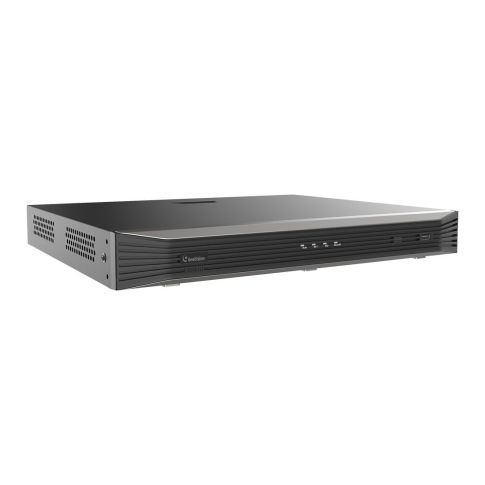
GV-TNVR1620-P • GeoVision

| Content | |
| System | |
| Operating System | Embedded Linux |
|---|---|
| Processor | N/A |
| RAM | N/A |
| Operating System Drive | N/A |
| AI Accelerator Module | N/A |
| Video | |
| IP Camera Inputs | 16 channels |
| Total Channels | 16 channels |
| Display | |
| Local Video Outputs | HDMI, VGA |
| Maximum Display Resolution | 4K UHD / 3840 x 2160 |
| Decoding Capability | 10 channels: 1080p @ 300 fps, 2 channels: 12MP @ 60 fps, 4 channels: 4MP @ 120 fps |
| Recording | |
| Video Compression | H.265, H.264 |
| Smart / Wise / Zip Streaming | N/A |
| Recording Bandwidth | 128 Mbps, 160 Mbps |
| Max Recording Resolution of IP Cameras | 12 MP |
| Analytics by Recorder | |
| AI Object Classification | Person, Face, Vehicle |
| Object Attributes | N/A |
| Facial Analytics | Face recognition, Face detection |
| Automatic number-plate recognition (ANPR) | N/A |
| Search and Playback | |
| Simultaneous Playback | 16 channels |
| AI Search | Person, Person attributes, Face, Face attributes, Vehicle, Vehicle attributes, Ultra MD, AcuSearch |
| Storage | |
| Built-In Disk | N/A |
| Number of Internal Disks | 2x SATA |
| Hot Swap | N/A |
| RAID | N/A |
| External Storage | N/A |
| Backup | |
| Backup | USB, Network |
| DVD-RW | N/A |
| Alarm | |
| Alarm Inputs | 8 inputs |
| Alarm Outputs | 2 outputs |
| Audio | |
| Audio Inputs | 1 CH (RCA), 16 CH (Network) |
| Audio Outputs | 1 CH (RCA) |
| Audio Communication | Two-way audio |
| Performance | |
| Easy Configuration | QR code scanning (P2P) |
| Fisheye Dewarping | Supported |
| Redundancy | N/A |
| Network | |
| Ethernet | 1x RJ-45 10/100/1000 BASE-T |
| Wireless Communication | N/A |
| Built-In PoE Switch | 16 PoE+ ports RJ-45 |
| Mobile & Desktop Applications | GV-Edge Recording Manager, GV-Eye |
| Interface | |
| DisplayPort | N/A |
| HDMI | 1x HDMI |
| VGA | 1x VGA |
| USB | 2x USB |
| eSATA | N/A |
| SAS (Serial Attached SCSI) | N/A |
| Serial Interface | N/A |
| Environmental | |
| Operating Temperature | -10°C ~ 55°C |
| Humidity | < 90% |
| Electrical | |
| Input Voltage | 100 ~ 240 V AC |
| Power Consumption | 12 W |
| Power Redundancy | N/A |
| PoE Power Budget | 240 W |
| Mechanical | |
| Dimensions | 380.0 x 355.0 x 53.0 mm |
| Net Weight (kg) | 2.70 |
| Casing material | Metal |
| Casing Color | Black |
| Mounting Type | Desktop, 19“ Rack mount 1U |
| Certification | |
| Certificates | NDAA, CE |
| Package | |
| Package Contents | Mouse, Rack mount kit, Quick Start Guide |
| Related Accessory | N/A |
| Link to Manufacturer | www.geovision.com.tw |
| Notes | Only a limited number of channels support video analysis. Please refer to the datasheet for detailed information on video analysis. |
Popular tools:
GV-IP Device Utility
GV-IP Device Utility detects any GeoVision devices within the same LAN. It allows you to quickly set the IP address, update firmware, export/import device settings for and reboot IP devices.
GV‐Edge Recording Manager
GV-Edge Recording Manger combines live monitoring and remote control of GeoVision IP devices and software into a single management interface.
If you need more help, please contact our technical support:support@gemtech.eu
Or call the phone number: 00421 52 7897891.
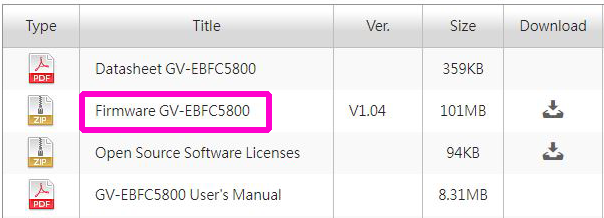
Download firmware:
You can always find the current firmware on the manufacturer's official website www.geovision.com.tw
In the search section, you need to enter the name of the camera and find the exact model. You will then search for the Download - Firmware tab.
In case of questions, please contact our technical support: support@gemtech.eu
Phone number: 00421 52 7897891